
Denna guide kommer att gå igenom allt du behöver veta för hur du beställer en 3D-utskrift hos oss och ge dig lite tips på vägen. Skulle du ha frågor om ett specifikt steg i processen kan du navigera via menyn till vänster.

Creating a 3D model can be done in a number of different ways, but we recommend that you create your model using a traditional CAD program as for example Autodesk, CATIA, PTC Creo, or FreeCAD. The geometry you create must have a thickness and be closed, i.e. not consist of surfaces with 0 mm thickness. We want the 3D file in STEP– or i STL-format. Utan 3D-fil kan vi inte återkomma med exakt prissättning för tillverkningen men Contact Us så hjälper vi er gärna med att ta fram en 3D-fil.
Det första du behöver göra är att identifiera kraven du har på den 3D-utskrift du vill beställa. Dessa krav behövs för att kunna avgöra vilken process och material som lämpar sig bäst för komponenten som ska tillverkas. Vad är syftet med detaljen? Är kraven för funktion viktigare än de visuella kraven eller tvärtom? Ska detaljen användas utomhus eller inomhus? Ju tydligare du kan vara med dina krav, desto enklare blir det att välja rätt process och material. Bra att ha med sig är att ju fler krav du har desto färre processer och material finns att tillgå samtidigt som behovet av efterbehandling ökar och priset går upp. Några saker du kan tänka på är:
På vår hemsida kan du läsa om de processer och material vi erbjuder. Behöver ni hjälp kan ni besöka vår Process- och materialväljare or kontakta oss direkt.
Once you have a clear understanding of the different printing processes and materials that we offer is the time to consider whether your parts need some kind of finishing method to achieve specific tolerance requirements or the desired color of the part. We offer various options for finishing, including coloring, polishing, CNC machining, painting and other surface treatments.
By carefully reading and considering which material(s), processes and finishing best meet your requirements, you will ensure that your 3D printing matches your expectations. If you need help from us in this work, just contact us in the chat, the contact form or via email.
If you already have an account with us, log in at the bottom of the box. Otherwise, fill in the fields with your information to create a new account.
Upload more 3D models (STL– eller STEP–files) by drag enter the geometries in the window or browse files on your computer. You can too retrieve yours earlier uploaded geometries. All your details you upload in our online tool are first put in a details list. Each detail then needs to be specified and then confirmed in order to end up in your queue, whereupon you can go ahead and place your order.

Detta steg är det viktigaste steget i att beställa 3D-utskrifter. Här väljer du hur 3D-utskriften skall skrivas ut samt vilket material och efterbehandling detaljen skall ha. Är du osäker på vad något betyder kan du trycka på ordet för att läsa mer. It is not until you have specified your item and clicked on "confirm" that your detail is moved from the list of models and ends up in your shopping basket.
a. Process: Here at TOP3D you will find a variety of 3d printing processes. This will affect the types of materials, finishing and options you can choose. The choice of process can be a bit tricky but we are here to help you! You can learn more about how to think when choosing a process here.
b. Materials: As we all know, material selection is an important part of the process when ordering 3D prints. Here you can choose different types of plastic and metal for the different processes we offer. You will find more information about our materials here.
c. Layer thickness: If you choose a smaller thickness, you will get a finer surface, but it may increase the cost. On the other hand, a higher thickness gives a little better strength and makes the part more economical to produce. This choice is for if you want a more aesthetic finish on the part or if strength is more important.
d. Infill rate: This is possible to specify for the process FDM and is a factor that describes how dense the core of the part is printed. The shell of the details are always solid, but by adjusting the density of the inner structure, the amount of material used is adjusted and thus the print time and the price. 100% infill rate innebär att detaljens kärna är helt solid, medan 0% infill rate innebär att detaljen är ihålig.
e. Color: Certain processes and materials give you the option of choosing a color, either by the material itself being offered in different colors or by the fact that the details can subsequently be dyed or painted in different colors.
f. Finishing: The different processes have different possibilities for finishing. Among other things, we offer polishing and machining. On the pages for our various processes, this is clear, as well as in our online quotation tool.
g. Additional services/other: Here you can decide if, for example, you want us to install gang inserts or if it is something else you want.

After you have determined the process and materials, you need to specify and perform the following.
a. Number: How many of this particular detail do you want?
b. Priority: In some cases, we can offer express production, which means that the part is manufactured faster.
c. Confirmation: When you confirm the order, the detail will be added to the shopping cart (cart), and you can now continue with the next detail.
If you have more details to order, you can go through step 5 again for the next file and if you need to make adjustments to the specifications of details that you have already added to the cart, that is perfectly fine.
d. Order details: When you have now finally put all the details in the shopping basket, we will move on to the window with invoicing and delivery. Click on "Add order details".
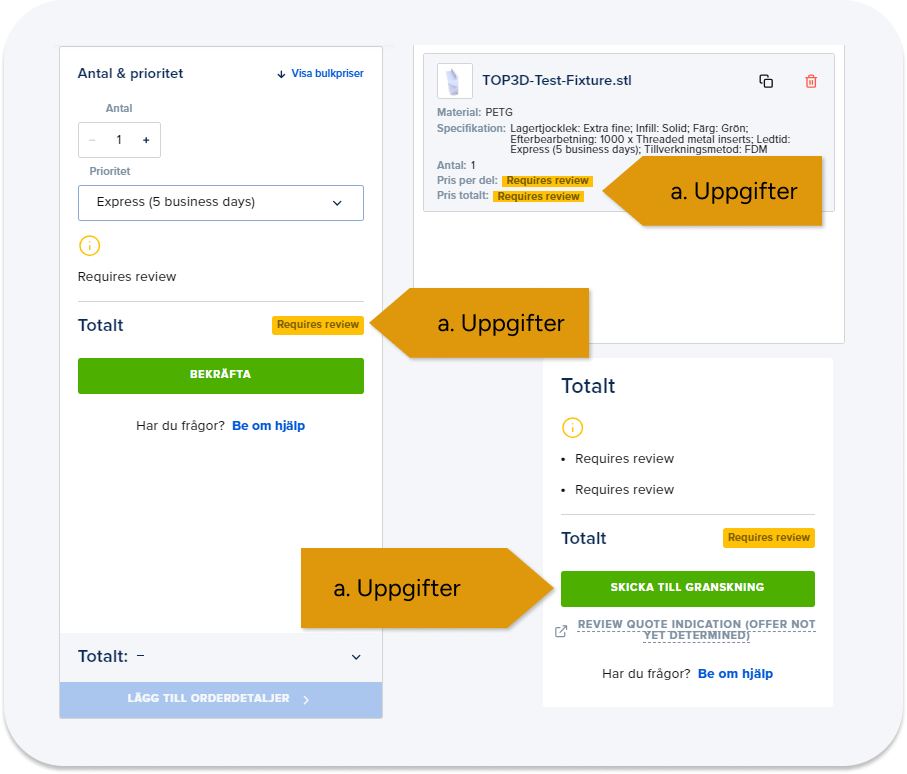
e. Undantagsgranskning: För stora ordrar med högre summor och höga antal behöver vi granska erbjudandet varpå ni inte kan bekräfta er order utan istället skickas er order på granskning. Detta är bara för att vi ska säkerställa att ni som kund får ut det bästa möjliga av era 3D-utskrifter till rätt pris.
På eran orderöversikt kommer det vid dessa tillfällen stå ”Requires review” och ”Skicka till granskning” . När du skickat in förfrågan och vi har granskat den så återkommer vi med en offert via mail. Här är ett exempel på hur detta kan se ut.

In this window you can check which products you want to order. Here you also have the option to remove details and change the number.
a. Data, You then fill in your details, including delivery information and invoice contact. Here at TOP3D, we are careful to treat your information securely and correctly.
b. If you have a sole proprietorship, you can enter your personal identification number in the field "VAT number."

a. Observe att vi har ett lägsta ordervärde på 2000 kr. Det innebär att om din order är lägre än 2 000 kr, måste du öka summan till detta belopp för att slutföra din order. Detta kan du göra genom att bekräfta ”Uppdatera ordervärdet till 2000 kr.”
b. When you are satisfied with the content of your order, just confirm the order if you want to place your order. Observera att beställningen är bindande och ni kommer inte kunna dra tillbaka den! When you have confirmed the order you will receive an email with confirmation of what has been submitted. We at TOP3D will now review your order before the products go into production. We do this to ensure everything is correct before we start producing your details. When this is done, you will receive another confirmation with the expected delivery date.
Your order is manufactured and sent by express delivery to your door.

Här svarar vi på det vanligaste kring beställning, pris och leverans. Ladda upp din 3D-fil i kalkylatorn ovan så får du pris direkt. Har du frågor om material eller konstruktion hjälper våra tekniker gärna till.
Ladda upp din 3D-fil i kalkylatorn ovan, välj process och material och få ett pris direkt. När du har lagt beställningen tillverkar vi delarna och skickar dem till dig. Är du osäker på vilket val som passar kan du ta hjälp av material- och processväljaren eller kontakta oss.
Vi tar främst emot STEP- och STL-filer. Ladda upp varje detalj som en egen fil, så kan vi räkna pris och planera produktionen per del.
Priset styrs framför allt av detaljens volym och vilket material du väljer. Geometri och komplexitet påverkar sällan priset särskilt mycket. Antal, efterbearbetning och leveranstid spelar också in. Ladda upp filen i kalkylatorn för ett exakt pris.
Ja, minsta ordervärde är 2 000 kr exklusive moms och frakt.
Ja, vid större antal sjunker oftast styckpriset. Vi tillverkar allt från enstaka prototyper till serier. Läs mer om serietillverkning med 3D-printing.
Standardleverans tar ungefär 3–15 arbetsdagar beroende på process och material. För många material erbjuder vi även express på cirka 1–2 dagar. Kontakta oss om du har ett brådskande projekt.
Det beror på vad delen ska klara, till exempel hållfasthet, värme, kemikalier eller ytfinish. Du kan välja själv, men vi rekommenderar gärna utifrån ditt användningsområde. Jämför MJF, SLS, SLA, FDM and 3D printing in metal.
Då hör vi av oss med förslag på vad som behöver justeras i modellen för att den ska gå att tillverka.
Ja, vi kan ta fram 3D-modellen åt dig utifrån ritningar, skisser eller en befintlig del. Contact Us och beskriv ditt projekt.
Alla kundprojekt behandlas konfidentiellt. Vid behov tecknar vi gärna ett sekretessavtal (NDA).
Ja, vi skickar till kunder i hela Sverige. Fraktkostnaden beror på storlek, vikt, fraktsätt och destination.
Nej, våra tjänster riktar sig just nu enbart till registrerade företag.
A CAD program, which stands for "Computer-Aided Design," is an important component when it comes to ordering 3D prints for industrial purposes. CAD programs are specialized software used to create detailed and accurate digital models of objects, components or prototypes. These digital models serve as basic blueprints or designs needed to produce physical objects using 3D printing technology.
.STL (stereolithography) is a file format used to represent 3D geometry, especially surfaces made up of triangles. It is a common format in 3D printing and is used to describe models to be printed in 3D printers.
.STEP (Standard for the Exchange of Product Data) is a standard for exchanging 3D models and product data between different CAD (Computer-Aided Design) programs. It is a common format in industry and is used to transfer detailed 3D models of components and products.